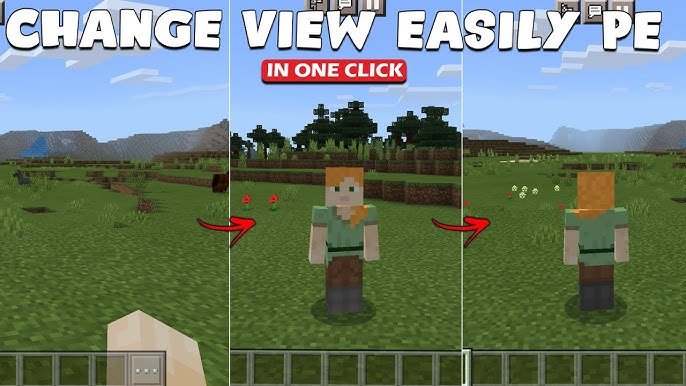
Ever been stuck staring at Minecraft from the same dull angle? How To Change Perspective In Minecraft is what you need to shake up your gameplay. Switching your camera view shifts your entire experience, letting you see your builds from fresh angles, dodge creepers more effectively, or just enjoy your pixelated world differently. Let’s get into how you can command your perspective like a seasoned player (that friend who always beats you at PvP). 🚀
Starting with basics, Minecraft offers mainly two perspectives: first-person and third-person. The first-person puts you right in the boots of your avatar, making the world immersive but sometimes limiting your view. The third-person view turns the camera around your character, making it easier to see your surroundings and your avatar’s movements which is a game-changer in combat or building precision.
How To Switch Perspectives In Minecraft
Switching perspectives is straightforward but varies slightly depending on your platform.
On PC (Java Edition)
Hit the F5 key to toggle between first-person, third-person back, and third-person front views. It’s that simple and immediate. Want to confirm? Try spinning your character and then hitting F5 to see the change.
On Minecraft Bedrock Edition (Console & Mobile)
On consoles, like Xbox or PlayStation, press down the D-Pad (usually the right on Xbox) to cycle views. On mobile, this is a bit tricky — you’ll need to enable the “Camera Perspective” button from the settings menu first and then tap it anytime during gameplay.
Fun fact — you can learn more about this innovative camera system from the Minecraft official documentation here. It breaks down the technical side if you want to get nerdy.
Why Change Your Minecraft Perspective?
Is switching perspective just a neat party trick? No way. It’s tactical and visually enriching!
- • Combat advantage: Third-person view lets you monitor attacks from both front and back.
• Building precision: See multiple sides of structures at once to build faster and cleaner.
• Exploration fun: Changing views lets you capture Minecraft landscapes like never before.
• Content creation: Streamers and YouTubers often switch perspectives to make videos more engaging.
Advanced Tips For Changing Perspective
Want to push the boundaries? Here’s how to make the perspective change work harder for you.
Custom Keybinding For Quick Switch
Don’t stick with default keys. Map perspective toggles to buttons you hit instinctively, minimizing disruption in gameplay.
Use Perspective Mods
Mods like “Controllable Camera” on Java Edition allow free camera movement, making it easier to scout or film your world. Always backup your saves before modding!
Utilize Commands For Camera Control
In Bedrock, commands can be a godsend. You can programmatically alter perspective or camera behavior which is perfect for map makers or adventurous players who want custom effects.
Common Troubleshooting With Perspective Changes
Sometimes, switching views feels buggy, especially on mobile or consoles. Here’s what to check:
- ✅ Ensure your game version is up to date.
✅ Verify settings to confirm the perspective button is enabled.
✅ Restart your device or game for glitches.
✅ On PC, check for conflicting mods.
Comparison Table: Perspective Features Across Platforms
| Platform | Default Toggle | Advanced Features | Customization |
|---|---|---|---|
| PC (Java) | F5 Key | Mods available for free camera | Fully customizable keybinds |
| Bedrock Console | D-Pad | Limited camera commands | Less customizable |
| Bedrock Mobile | Enable Camera Button | New camera system support | Settings toggle |
If you want a quick visual tutorial for Minecraft mobile perspective switching, check this well-made video demonstrating the step-by-step method to toggle views on pocket editions found on YouTube.
Wrap Up: Perspective Power in Minecraft
Mastering How To Change Perspective In Minecraft isn’t just about aesthetics. It’s about equipping yourself with an edge, a wider lens on your pixel playground, and unlocking new ways to appreciate your creativity and survival tactics. Whether you’re building a sprawling castle or sneaking past zombies, your perspective metric alters the way you play and perceive. So, hit those controls, experiment, and don’t forget that swapping perspective can be a lifesaver or the secret to your next epic creation. Keep exploring with fresh eyes in 2026 and beyond! 🚀

Source: www.youtube.com
Frequently Asked Questions
How do I change the perspective in Minecraft Pocket Edition?
To change perspective in Minecraft Pocket Edition, enable the Camera Perspective button in settings, then tap it during gameplay to toggle views.
Can I customize the perspective change key on PC?
Yes, on Java Edition for PC, you can customize keybinds including the one for changing perspectives, offering more gameplay comfort.
Is third-person view better for combat in Minecraft?
Third-person view gives better situational awareness during combat, letting you see enemies approaching from behind.
Are there mods that improve perspective control?
Certain mods like the Controllable Camera mod provide advanced camera options for Java Edition players to freely move the perspective.
Why does the perspective toggle not work on my console?
Your console might need a game update, or the controller settings may be conflicting. Restarting or reconfiguring controls usually fixes this.

Christina is a technical guide writer and gaming enthusiast with years of experience breaking down complex game settings. Specializing in server optimization and game mechanics, they are dedicated to helping players seamlessly customize their Minecraft experience—from updating skins and usernames to managing technical version settings.