Ever dream of flipping the Minecraft world from day to night in a blink? Wonder how exactly to change time of day in Minecraft without waiting hours? Well, buckle up! This guide is no fluff. It dives straight into how to wield the power of time with simple commands and effective settings adjustments to control Minecraft’s world clock like a boss. Whether you are stuck in endless night or want to freeze that perfect sunset, knowing how to change time of day in Minecraft unlocks a whole new dimension of gameplay fun.
- Minecraft day lasts 20 minutes real-time.
- Commands let you jump to any time instantly.
- You can toggle daylight cycle on or off.
- Available on Java and Bedrock editions.
Understanding Minecraft’s Time System
First off – Minecraft operates on a 24,000 tick day cycle translating roughly into 20 real minutes per full day. Game time starts fresh at dawn, ticks through day, sundown, night, and back. 🌅 But what if patience isn’t your virtue and you’d rather rip through time instead?
The Daylight Cycle Explained
The daylight cycle is the engine spinning the hands of Minecraft time, affecting mobs, crops, and lighting. Muting or manipulating this cycle is key to changing the time of day effectively.
How To Change Time Of Day In Minecraft: Commands
- Accessing Commands: You must have cheats enabled in your world to toggle time. On Java Edition, open the chat with
Tkey; Bedrock Edition users use the chat icon. - Basic Time Commands: Use
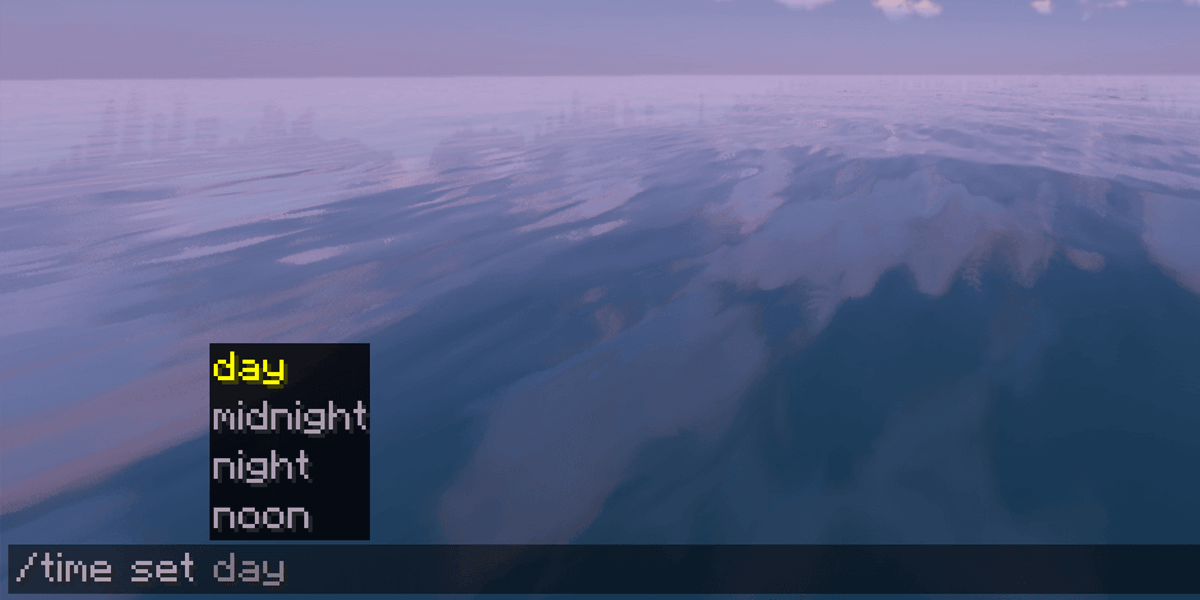
/time set dayto jump straight to morning (tick 1000). Want night?/time set nighttransports you instantly (tick 13000). - Setting Specific Ticks: For precision, commands like
/time set 6000put the game at noon. - Check Current Time: Typing
/time query daytimereveals the current tick count.
Voilà! Commanding time grants total control—perfect for building projects or adventure lighting needs. Plus, you can visit this in-depth daylight cycle explanation on Stack Exchange to get nerdy about toggling day-night transitions.
Toggle Daylight Cycle: Stop Time Moving
If you love a dusk vibe or want to pause the world’s clock, halting the daylight cycle is simple. Just enter:
/gamerule doDaylightCycle false
This freezes time, locking the world at whatever time you choose—ideal for cinematic screenshots or design phases without pesky nightfall. Turn it back on with:
/gamerule doDaylightCycle true
Using Command Blocks for Automated Time Control
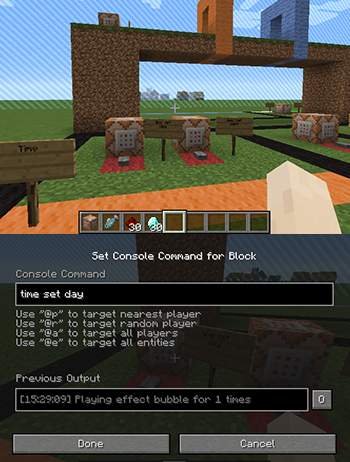
Command blocks elevate your time control game. Hook them to redstone to create automated systems cycling days or nights endlessly or tied to specific player actions. Imagine dawn breaking every morning the moment you enter your base. 🔥
Step to Setup
- Give yourself a command block with
/give @p command_block. - Place and right-click it to open interface.
- Insert
/time set dayor any time command. - Connect with redstone triggers.
How To Change Time Of Day In Minecraft in Different Game Modes
Creative and Survival modes handle time changes differently as commands may be disabled in survival multiplayer for balance. Always verify server settings or world options.
Minecraft Bedrock vs Java: Time Command Variations
The /time command works similarly across editions, but syntax nuances exist. Bedrock players can check a recent tutorial video on how to quickly use /time in Minecraft Bedrock to get up to speed.
Common Mistakes When Changing Time
• Forgetting to enable cheats or commands.
• Misusing tick values causing weird lighting.
• Ignoring multiplayer world restrictions.
• Neglecting to re-enable daylight cycle after experiments.
Tips for Perfect Time Control
- Always double-check if cheats are enabled before trying commands.
- Use command blocks only if familiar with redstone mechanics.
- Back up your world before making major changes.
- Experiment with time settings in creative first for safety.
Developer Insights on Minecraft Time Mechanics
Mojang designed time to impact gameplay profoundly: mob spawning, crop growth, and event triggers depend crucially on time. Mastering it flips your playstyle from reactive to proactive.
Conclusion: Why Mastering How To Change Time Of Day In Minecraft Matters
So, by now, you get how to change time of day in Minecraft not just for convenience but to command your whole environment dynamically. Whether designing, surviving, or just messing around, controlling time upgrades how you experience Minecraft endlessly. Don’t just play—take control. Everyone’s got hours to wait for night; you don’t have to be that player. Remember, precision with commands, safety with settings, and creativity with cycles make you the real wizard of Minecraft time.
Source: serverminer.com
Frequently Asked Questions
Can I change time of day in Minecraft without cheats?
No, changing the time of day requires cheats to be enabled in your Minecraft world. Without cheats, the game’s time advances naturally, and you can’t alter it manually.
What command sets it to nighttime instantly?
Simply use /time set night to jump instantly to night (tick 13000) and enjoy the dark hours immediately without waiting.
How do I stop time moving altogether?
Enter /gamerule doDaylightCycle false to freeze the world’s time so it won’t shift from the current moment. Toggle it back on with true.
Are time commands the same between Java and Bedrock editions?
Mostly yes, but the execution might differ slightly; Bedrock has its quirks documented in tutorials like the TikTok guide for /time usage, whereas Java commands are widely explained in community forums.
Can command blocks automate time changes in Minecraft?
Absolutely! Command blocks can be programmed to repeatedly set or switch times triggered by redstone circuits, perfect for automated day-night schedules or events.

Christina is a technical guide writer and gaming enthusiast with years of experience breaking down complex game settings. Specializing in server optimization and game mechanics, they are dedicated to helping players seamlessly customize their Minecraft experience—from updating skins and usernames to managing technical version settings.