Ever been stuck watching the dreaded half-night in Minecraft when you want to jump right into daylight for building or adventure? 🕹️ That’s where knowing How To Change Minecraft Time flips your world on its head—in a good way. Forget waiting for the sun to rise naturally; you’ll be calling the shots with simple commands that any player can master in minutes. Whether you’re on Java or Bedrock edition, tweaking time can reshape your gameplay, from speeding up day cycles for farming to creating mood-perfect settings for storytelling or PvP battles. Let’s jump straight into this game-changer!
Understanding Minecraft Day and Night Cycle
Minecraft operates on a 24,000 tick system representing a full day that lasts 20 minutes in real time. Daylight lasts about 10 minutes, then night takes over. This cycle affects mob spawning, plant growth, and visibility. Knowing how to change Minecraft time lets you control these factors to your advantage. Instead of squinting through creeper-infested nights, you can enjoy uninterrupted daylight or spooky nights on demand.
Why Change Time in Minecraft?
- Speed up farming and resource gathering
- Create perfect lighting for adventures or builds
- Control mob spawning for challenges
- Customize PvP matches with timed settings
- Improve visibility for exploration
Methods to Change Minecraft Time
It’s not just about typing commands, Minecraft offers various ways to shift time. Below, we explore the main techniques available.
Using Commands (Cheats Enabled)
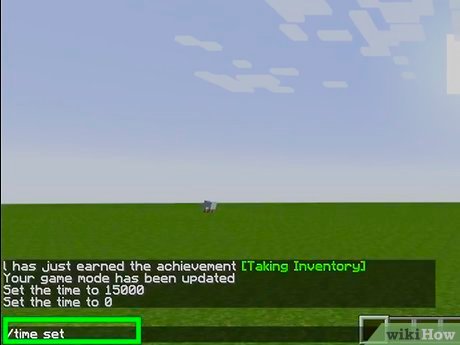
The most straightforward method involves Minecraft’s command line. You need cheats enabled in your game settings to use these commands. To change time, you use the /time set command. Here’s how:
- Open the chat window by pressing T.
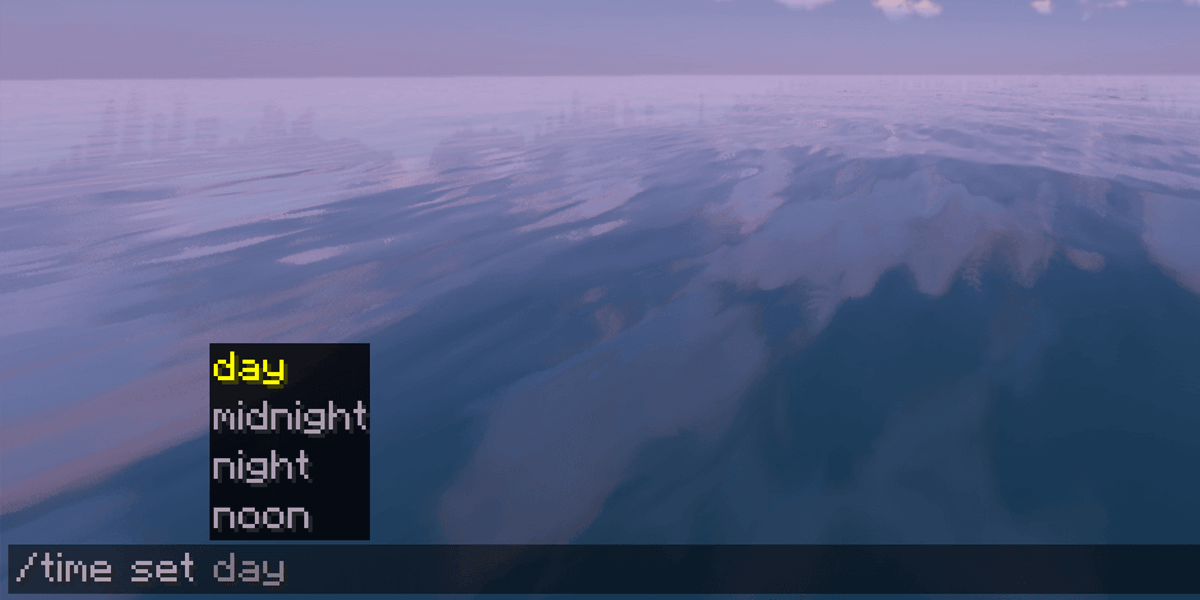
- Type
/time set dayto make it daytime instantly. - Or specify number values like
/time set 0for dawn,/time set 6000for midday,/time set 12000for dusk, and/time set 18000for midnight.
This flexibility gives you precise control over your Minecraft world’s time. For continual control, use /gamerule doDaylightCycle false to freeze time at your chosen point.
Changing Time on Minecraft Server
Running a server? The ability to change time becomes even more crucial. Server owners use similar commands, but must also manage player permissions to avoid abuse. Commands like /time set and /time add are fully functional.
A solid approach is scheduling time changes with plugins, but manual command input remains king for instant tweaks. You can learn more about server timing commands from this detailed guide on changing Minecraft server time.
Using Mods and Plugins
Many mod packs include time control features—offering visual interfaces and automation options so you don’t have to remember commands. While mods add complexity, they can enhance gameplay significantly when you want more custom control beyond raw commands.
Practical Examples of Time Manipulation
Imagine you’re hosting a Halloween-themed event in Minecraft. You want continuous night with only controlled bursts of daylight for dramatic effect. Simply freeze night time using commands and unleash quick day flashes whenever you want.
An evening gamer focused on building often prefers locking time during the day to avoid hostile mob spawning. Here, /gamerule doDaylightCycle false is your best friend.
Step-by-Step: How To Change Minecraft Time
- Launch Minecraft with cheats enabled in your world.
- Press T to open chat.
- Type
/time set 1000(or any desired time number). - Press Enter. Notice the world’s lighting changes immediately.
- Optionally, use
/gamerule doDaylightCycle falseto freeze time.
Troubleshooting Common Time Command Issues
If commands don’t work:
- Check if cheats are enabled (in settings or server configs).
- Verify you have operator or admin privileges on servers.
- Confirm command syntax is correct—commands are case-sensitive.
- Some multiplayer servers disable command usage to prevent exploits.
Maintaining Your Time Settings
You can reset time at intervals by scheduling command blocks or using mods. Learning to automate time changes can reduce manual input and keep gameplay fluid.
Safety Considerations for Command Usage
Commands can disrupt game balance if used recklessly in multiplayer. Make sure you discuss any time manipulations with your group or server prior to changes. Misuse can spoil fun or cause unexpected bugs.
💬 “Using time commands in Minecraft allowed me to build during the perfect lighting and conduct epic night raids on my own timing.” — Gamer LizzyM
More On Minecraft Time Tricks
Curious for more advanced tips? Check video tutorials on setting time of day in Minecraft Java and Bedrock editions for visual demos and power-user moves.
Summary
Now that you know How To Change Minecraft Time, wielding the day-night cycle feels less like magic and more like a skill. Don’t just wait for day to come—take the reins! Command your world like a pro and create gameplay experiences that stand out. Next time you launch Minecraft, try testing out these commands. Light up your builds, challenge yourself with timed puzzles, or craft the perfect PvP arena with time locked just right. ⏰
Keep those cheats handy because controlling the clock is a game-changer you won’t want to live without.
Source: serverminer.com
Frequently Asked Questions
How do I enable cheats to change Minecraft time?
Cheats can be enabled when creating a new world by toggling the “Allow Cheats” option. In existing worlds, you can enable cheats by opening the game to LAN and allowing cheats temporarily.
What command sets the time to night in Minecraft?
Use /time set 13000 to set the world time to night instantly.
Can I change Minecraft time on multiplayer servers?
Yes, but only if you have operator permissions or if the server allows time commands. Without permissions, these commands won’t work.
Does changing time affect mob spawning?
Absolutely. Spawning rates depend on the light level which varies by time of day, so changing time directly influences mob appearances.
Is it possible to freeze time in Minecraft?
Yes, use the command /gamerule doDaylightCycle false to stop time progression.
Are there differences between Java and Bedrock editions for time commands?
Most basic time commands are identical, but some advanced commands and mod capabilities vary slightly between the two editions.

Christina is a technical guide writer and gaming enthusiast with years of experience breaking down complex game settings. Specializing in server optimization and game mechanics, they are dedicated to helping players seamlessly customize their Minecraft experience—from updating skins and usernames to managing technical version settings.