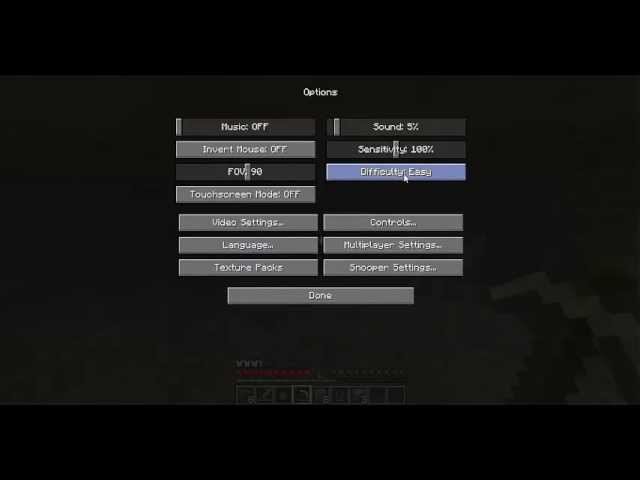
Ever gotten stuck wondering how to change difficulty in Minecraft right in the middle of a nerve-wracking zombie siege? Yeah, it’s a game-changer (pun intended). 🔥 Minecraft’s challenge level actually shapes your entire gameplay experience—from harmless piggie chats to full-blown creeper invasions. Shifting difficulty levels can tweak the thrill factor or reduce frustration. Quickly adjusting difficulty is something every player needs nailed down, whether you’re diving into Survival mode or messing around in Creative.
What Does Changing Difficulty Affect?
Before you dive in, understand the impact. The difficulty in Minecraft influences:
- The damage hostile mobs deal
- Whether your hunger bar depletes (on Hard, you lose health from starvation!)
- Mob spawn rates and aggressiveness
- Whether your health regenerates automatically
Where to Change Difficulty In Minecraft
Depending on your Minecraft edition, the ways you can tweak difficulty vary. Here are the main methods:
1. Using the Pause Menu (Java & Bedrock Edition)
Pause the game, navigate to “Settings,” then “Game settings,” and look for the “Difficulty” option. Easy, Normal, Hard, and Peaceful await you. Switch as you please, but remember some modes lock you out from achievements.
2. Via Commands
For those who enjoy command-line precision, the /difficulty command is your friend. Open chat and type /difficulty easy (or peaceful, normal, hard), and bam—you’re set. Note: Cheats must be enabled for this.
3. Editing Server or World Files
Offline worlds let you poke into server.properties or level.dat files to manually set difficulty values. Slightly advanced, but handy if the game menu isn’t cooperating. More info on Minecraft difficulty adjustments can be discovered in specialist community guides like the Minecraft difficulty settings on StackExchange.
Change Difficulty in Different Minecraft Versions
You’d think changing difficulty is the same everywhere, but Minecraft editions differ a bit.
Bedrock Edition
The easiest path is through pause -> settings. The difficulty reshuffle is live; changing takes immediate effect on your world.
Java Edition
While the pause menu method exists, Java demands extra caution with cheats and commands. Also, if you’re on a server, the difficulty might not be adjustable unless you’re an admin.
When Should You Change Difficulty?
Imagine you just defeated the Ender Dragon (congrats!) but suddenly it feels too easy. You want the real scare again. Or maybe your little sibling jumped into your world and you want the gentle Peaceful setting. Timing here varies:
- Before starting a new world to match your mood
- Mid-game, when you want to sharpen or relax gameplay
- When building, often easier difficulties help avoid mob interference
Pro Tips for Handling Difficulty Changes
- Toggle difficulty on peaceful before big construction projects.
- Use commands to swiftly jump between difficulty levels during testing.
- Remember that hard difficulty boosts mob damage seriously—don’t underestimate it!
- Backing up your world file before changes is smart backup hygiene.
Common Issues Changing Minecraft Difficulty & Fixes
- Difficulty setting greyed out: Usually, cheats are disabled. Enable cheats or run commands via server admin.
- Difficulty resets after relaunch: Check if your server overrides local settings or if a plugin forces specific difficulty.
- Your achievements are disabled: Switching to Peaceful can sometimes block progress; re-enable Normal or Hard to recover.
Hands-On Example: Changing Difficulty Mid-Game Using Commands
1. Press ‘T’ to open chat.
2. Type /difficulty hard and press Enter.
3. Watch your world transform as mobs become deadlier.
Yes, it’s that simple. Want to tone it down later? Just switch to easy or peaceful anytime. This command is especially useful if you want that perfect balance without restarting.
Why You Should Care About Difficulty Settings
Difficulty isn’t just a knob; it customizes your entire Minecraft story. It controls tension, resource management, and even social play style. Trust me, messing with difficulty is like choosing your narrative’s pace. One moment you’re chilling, the next you’re screaming at creepers—it’s the spice of Minecraft life.
Final Thoughts on How To Change Difficulty In Minecraft
Knowing how to adjust challenge levels lets you craft your ideal Minecraft world. Whether hardcore thrill-seeker or casual builder, this simple skill ensures the game’s vibe suits your style. So don’t hesitate—shift that difficulty slider, experiment with commands, and own your Minecraft journey in 2026 and beyond.
For extra detailed instructions on game difficulty changes, the comprehensive Minecraft difficulty guide by G-Portal breaks down all versions and scenarios impeccably.

Source: www.youtube.com
Frequently Asked Questions
Can I change difficulty in Minecraft after creating my world?
Yes, both in single-player and multiplayer, difficulty can be changed anytime via settings or commands, as long as server rules allow it.
Does changing difficulty affect my saved game progress?
No, changing difficulty does not erase your world or progress but can alter gameplay experience and mob behavior.
What are the different difficulty levels in Minecraft?
There are four: Peaceful, Easy, Normal, and Hard. Each affects mob aggression, damage taken, and hunger differently.
How do I enable cheats to use the difficulty command?
Enable cheats in your world settings before starting or through server configurations if on multiplayer.
Will switching to Peaceful mode stop all threats?
Peaceful mode disables hostile mobs spawning but does not remove environmental hazards like fall damage or lava.
Is changing difficulty recommended for beginners?
Definitely! Starting peaceful helps beginners learn basics without combat stress; they can shift difficulty as confidence grows.
Why is my difficulty setting grayed out on Minecraft?
This usually means cheats are disabled or you don’t have the necessary permissions in multiplayer environments.

Christina is a technical guide writer and gaming enthusiast with years of experience breaking down complex game settings. Specializing in server optimization and game mechanics, they are dedicated to helping players seamlessly customize their Minecraft experience—from updating skins and usernames to managing technical version settings.