Ever been stuck wondering how to change gamemode Minecraft without disrupting your epic world-building or tense survival runs? You’re not alone. Every player craving control over their gameplay needs this knowledge—whether you’re diving into the iconic Java Edition or chilling in Bedrock’s expansive universe. The ability to switch between gamemodes opens up wild possibilities, from creative construction to hardcore survival thrills.
Understanding Minecraft Gamemodes
Let’s break down what these modes actually mean:
- • Survival: Gather resources, tackle mobs, manage hunger.
• Creative: Infinite items to build with no damage taken.
• Adventure: Designed for custom maps with restrictions on breaking blocks.
• Spectator: Fly through blocks and watch without interacting.
Why Change Gamemode?
Imagine you’re working on a sprawling castle but suddenly want to test defense traps in Survival mode. Switching gamemodes mid-play keeps your flow alive without restarting. This flexibility is a game-changer (pun intended) for creators and hardcore gamers alike.
How To Change Gamemode Minecraft in Java Edition
Want that instant power? Use the in-game console commands. First, ensure cheats are enabled on your world:
- 1. Pause the game, select “Open to LAN”.
2. Turn on “Allow Cheats” and start LAN world.
3. Hit “T” or “/” to open chat.
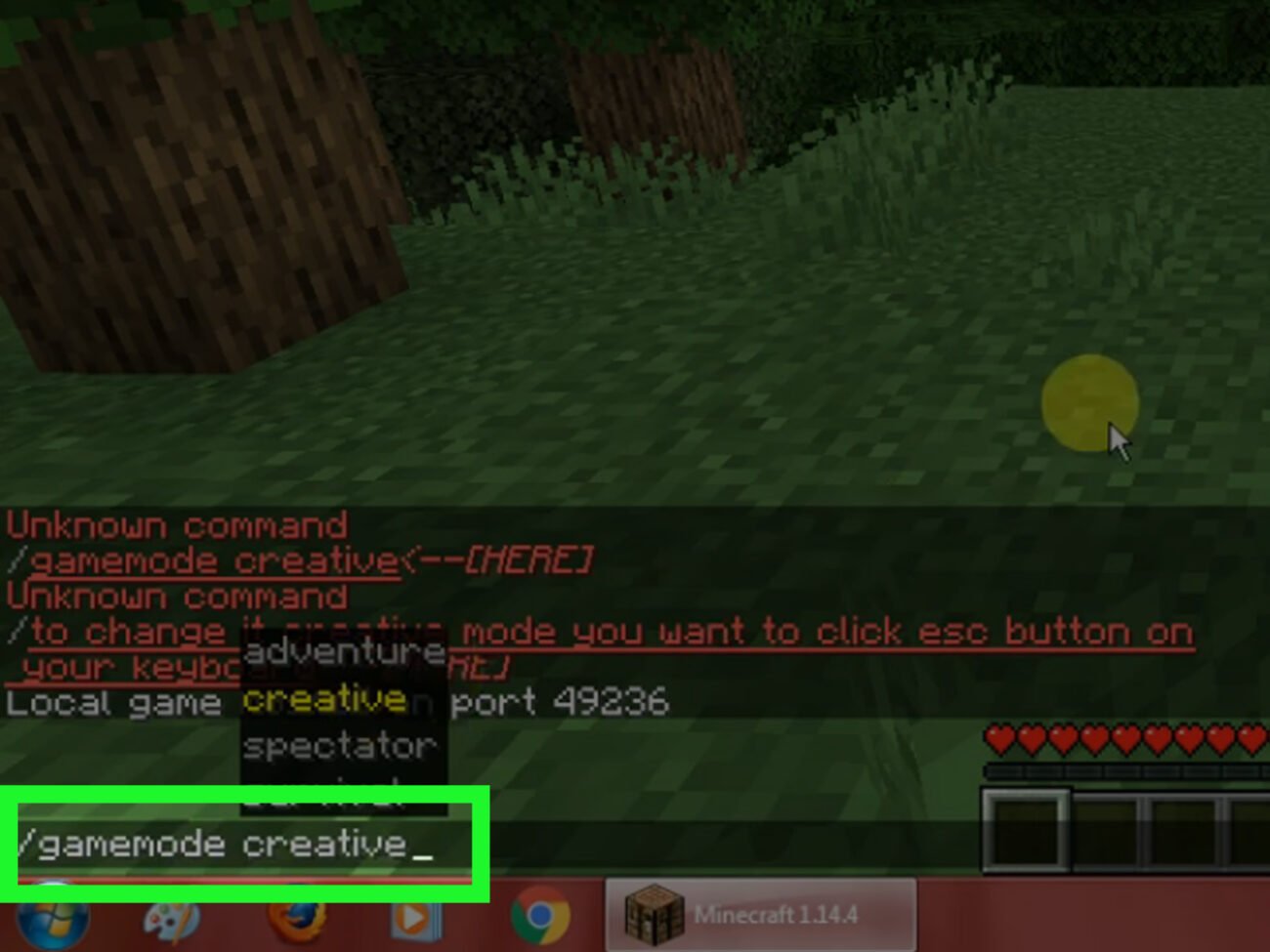
4. Type
/gamemode [mode], replacing [mode] with creative, survival, adventure, or spectator.5. Press Enter and watch the magic happen.
For example, to switch to Creative mode, type /gamemode creative. Easy, no? Remember this only works if cheats are active or you’re the server admin.
Changing Gamemode Minecraft in Bedrock Edition
Bedrock players, your switch is slightly different but just as straightforward!
- • Enable cheating in world settings.
• Access chat and type
/gamemode [mode].• Modes can be abbreviated: c (creative), s (survival), a (adventure), sp (spectator).
Try /gamemode c for creative mode instantly without fuss.
Switch Gamemode Using Command Blocks
Ready to get fancy? Command blocks automate gamemode switching when activated, perfect for adventure maps or events.
- 1. Give yourself a command block:
/give @p minecraft:command_block.2. Place it and enter:
gamemode creative @p3. Power it with redstone.
4. Step back as your gamemode flips! 🚀
How Multiplayer Servers Handle Gamemode Changes
On servers, only ops or admins often have permission to toggle modes. Use commands like /gamemode creative [player] to change others’ modes. Pro tip: double-check your server’s permissions plugin to avoid headaches.
Common Mistakes and Troubleshooting
- • Forgetting to enable cheats leads to command errors.
• Typing wrong gamemode names causes command failures.
• Multiplayer restrictions can block changes.
• Outdated Minecraft versions may not support all modes.
If you encounter issues, verify cheat settings, check for typos, and confirm your Minecraft version is up-to-date.
When To Use Each Gamemode
| Gamemode | Best Use Case | Limitations |
|---|---|---|
| Survival | Standard gameplay with resource gathering and combat. | Must manage hunger and health. |
| Creative | Building large structures or testing ideas. | No challenge — invincibility. |
| Adventure | Playing custom adventure maps. | Cannot break blocks without tools. |
| Spectator | Exploring maps without interference. | No interaction with the world. |
Safety Considerations When Changing Gamemode
Switching gamemode on survival runs might spoil your game’s challenge or accidentally expose you to threats if done recklessly. Always save your world! Some prefer to create backup copies before toggling modes, especially on complex builds.
Expert Tips for Gamemode Switching
- ✅ Use command blocks to automate gamemode changes.
✅ Create shortcut macros if you frequently switch modes.
✅ Communicate with multiplayer admins for smooth transitions.
✅ Use spectator mode to scout large areas safely.
✅ Avoid changing gamemode to cheat on multiplayer servers unless explicitly allowed.
💬 “Switching between creative and survival modes multiple times helped me perfect my mega city project without losing progress or risking mobs attacking me.” — Alex, veteran Minecraft builder
For a detailed video guide on using gamemode commands in both Java and Bedrock editions, watch this thorough walkthrough on changing gamemodes by a trusted Minecraft content creator How To Change Your Gamemode in Minecraft (Java & Bedrock).
And if you’re curious about how to change gamemodes on a multiplayer server even when offline, the community discussion How can I change my gamemode while not currently playing the game? offers savvy server command tricks worth considering.
Ultimately, How To Change Gamemode Minecraft is a fundamental skill every player should master by 2026. Whether you’re building, surviving, exploring, or creating adventures, this knowledge gives you control and precision over your gaming experience. So gear up, keep your commands ready, and enjoy making your Minecraft worlds work exactly the way you want them to! 🚀

Source: www.youtube.com
Frequently Asked Questions
Can I change gamemode without enabling cheats?
No, enabling cheats is essential to use gamemode commands unless you are on a server where you have administrative privileges.
What is the difference between adventure and survival modes?
Adventure mode restricts breaking and placing blocks without the correct tools, ideal for custom maps, whereas survival mode allows full interaction with resource management and mob threats.
Can I switch gamemodes on a multiplayer server?
Yes, but only if you have permission or operator status. Some servers restrict gamemode changes to avoid unfair advantages.
How do command blocks help with gamemode changes?
Command blocks automate gamemode switches with redstone activation, allowing on-demand transitions during gameplay without manual input.
Is spectator mode available on all Minecraft editions?
Spectator mode is primarily available in Java Edition; it has limited presence in Bedrock Edition and may require enabling experimental gameplay features.

Christina is a technical guide writer and gaming enthusiast with years of experience breaking down complex game settings. Specializing in server optimization and game mechanics, they are dedicated to helping players seamlessly customize their Minecraft experience—from updating skins and usernames to managing technical version settings.