Ever wondered how to change time Minecraft style? Imagine you’re deep in a Minecraft world, night is falling, and mobs start creeping up (yikes!). You want to flip that night switch fast, but how? This guide breaks down every nitty-gritty detail on manipulating Minecraft’s time, making your gameplay smoother and way more fun. We’ll dive into commands, tricks, and sneaky cheats so you never get caught off guard again. 🚀
Why Change Time in Minecraft?
Changing time in Minecraft isn’t just for flexing cheat skills. Say you’re building an intricate redstone project and want perfect visibility, or maybe you just want to skip the scary monster-packed night—changing the time puts you in control.
Understanding Minecraft Time Basics
- Minecraft measures time in “ticks.” 1 second equals 20 ticks.
- A full day-night cycle = 24000 ticks (20 minutes real-time).
- Day starts at tick 0 (sunrise); night starts around tick 13000.
How To Change Time Minecraft: The Command Method
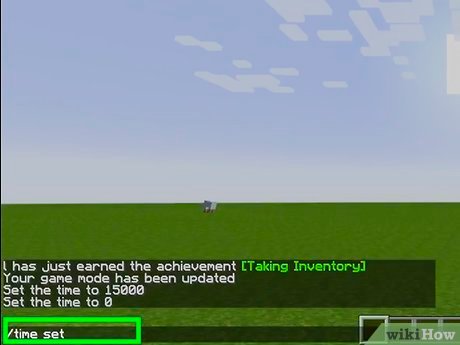
The sure-fire way to bend time is through commands—specifically the /time set command. This works in both singleplayer (with cheats enabled) and multiplayer worlds (if you have the right permissions).
- Open the chat console by pressing
Tor/. - Type
/time set dayto make it daytime immediately. - Use
/time set nightfor nightfall on demand. - For more control, specify the exact tick:
/time set 6000for noon, for instance.
Want a real pro tip? Try /time add to shift time forward by ticks without setting exact ticks. This is handy in command blocks and automation.
Curious about how commands impact your experience? Check out the official Minecraft commands documentation to explore all possibilities: Minecraft official commands guide.
Automating Time Changes with Command Blocks
If manual commands aren’t your jam, command blocks have your back. Imagine your world shifting seamlessly from day to night on a timer, no typing required. Here’s how to use them:
- Place a command block with
/time set day. - Connect it to a redstone clock circuit.
- Adjust timing so it triggers every 20 minutes or as you desire.
- This setup automates your day-night cycle perfectly.
Mastering command blocks feels like being a Minecraft tech wizard. For intricate command advice, the community’s Q&A sites provide clever scripts like toggling day/night automatically: advanced command examples on Stack Exchange.
Changing Time on Minecraft Servers
Server admins wield powerful control over the world’s timing. If you play on a server:
- Admins use commands like
/time setor plugins to manage the environment. - Client players without permissions cannot alter time.
- If you want to request time changes, contact your server admin.
Why time control is crucial on servers
Some servers keep night always on for challenge, others flip day/night cycles for realism. Time control affects gameplay balance and player experience massively.
Visual Effects and Time Manipulation
Time changes don’t just shift brightness; they trigger mob spawns, crop growth, and even block behaviors. Nighttime? Zombies roam wild. Daytime? Sunshine boosts farming.
Common Mistakes When Changing Time in Minecraft
- Not enabling cheats prevents command execution.
- Using incorrect tick values leads to confusion (e.g., 0 vs. 24000 can seem the same but may behave differently).
- Assuming commands alter time for everyone in multiplayer without proper permissions.
Best Practices for Time Control
Stick to these if you want smooth Minecraft experience:
- Enable cheats only in worlds where adjustments are needed.
- Test commands in a safe environment before applying widely.
- Communicate with other players on servers about time changes.
Bonus: Keyboard Shortcuts for Quick Responses
Some Minecraft versions offer shortcuts or mods that expedite time control. Fiddling with keyboard combos can save your skin fast in survival mode. For example, toggling debug info can sometimes provide context for timing. Check out practical gameplay tips here: Minecraft video guide on controls and shortcuts.
Advanced Time Change Techniques
Want to simulate dawn or dusk effects? Combine time commands with weather commands (/weather clear) for dramatic scenes. Or script time changes via datapacks and mods for really creative storytelling and server events.
Summary: Why Mastering “How To Change Time Minecraft” Is Worth It
Command-based time control isn’t just a gimmick—it’s a core tool for anyone serious about customizing Minecraft worlds. From builders to server heroes, knowing how to flip day and night on demand saves frustration and cranks up fun.
Your journey to change time in Minecraft is now not just possible—it’s simple, efficient, and highly rewarding. So next time darkness threatens your creative spree or you want to bask in Minecraft sunshine, remember this guide’s secrets. You’ve got the power to rewrite time itself. 🚀

Source: www.idtech.com
Frequently Asked Questions
How do I enable cheats to change time in Minecraft?
You enable cheats by selecting the ‘Allow Cheats’ option when creating a new world or by opening to LAN and enabling cheats temporarily in existing worlds.
Can time changes affect multiplayer other players?
Yes, if you have the right permissions, time changes you make affect everyone on the server, synchronizing the day-night cycle globally.
What tick values correspond to day and night in Minecraft?
Tick 0 is sunrise (start of day), tick 6000 is noon, and tick 13000 is the beginning of night.
Is it possible to automate time changes without commands?
Automation requires commands tied to command blocks or datapacks; the base game doesn’t allow time change automation without commands.
Why won’t my /time commands work?
This usually happens because cheats aren’t enabled, you lack permissions on servers, or the command is mistyped.
Can I use command blocks to switch time repeatedly?
Absolutely! Command blocks connected to redstone clocks can repeatedly switch time, creating cycles or custom day lengths.
Where can I learn more about Minecraft commands?
The best place is the official Minecraft commands documentation or active community sites such as Minecraft Stack Exchange.
Interested in a video walk-through on changing time? Check this complete tutorial on how to change the time in Minecraft effectively for visual learners.

Christina is a technical guide writer and gaming enthusiast with years of experience breaking down complex game settings. Specializing in server optimization and game mechanics, they are dedicated to helping players seamlessly customize their Minecraft experience—from updating skins and usernames to managing technical version settings.