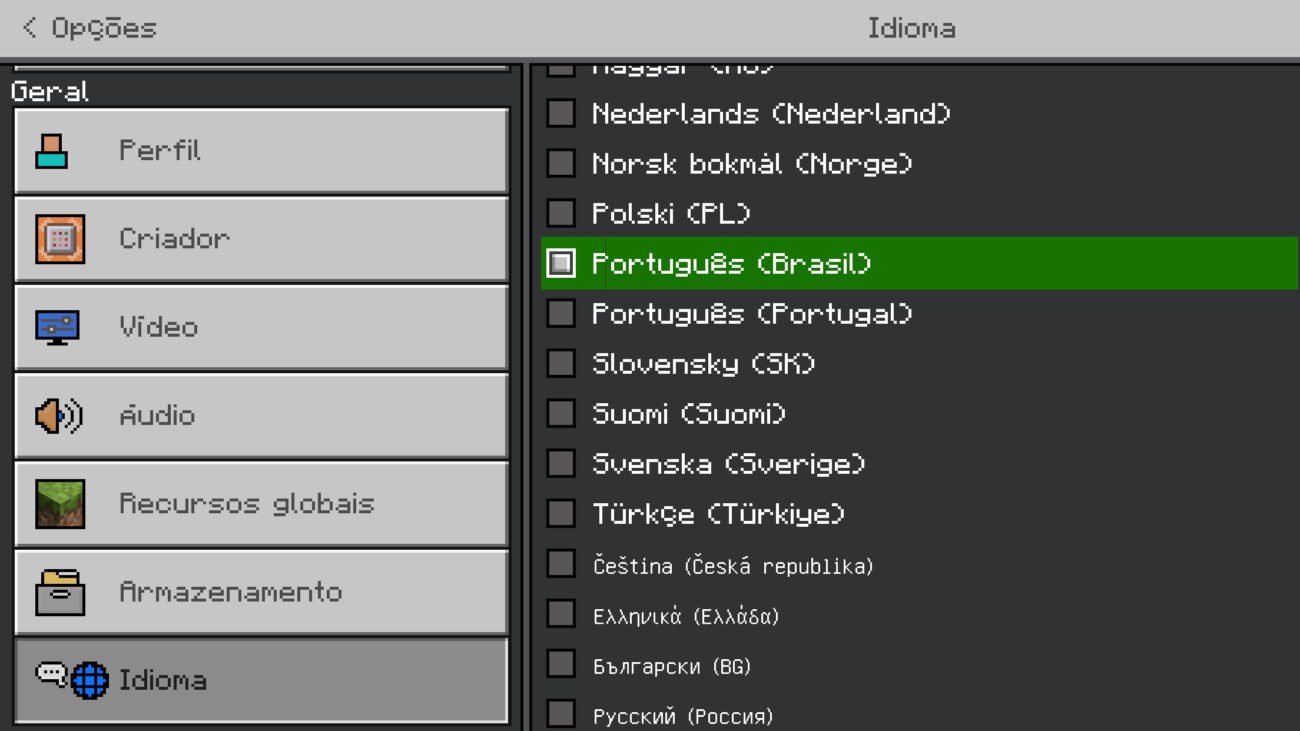
Ever launched Minecraft and suddenly realized all the menus and text are in a language you don’t speak? Getting stuck with the wrong language isn’t just frustrating; it totally ruins the vibe. This is why knowing How To Change Minecraft Language inside the game can save your day and your gameplay. Whether you’re messing around in the Java Edition or the Windows 10 Education Edition, tweaking language settings is surprisingly straightforward once you know the secret steps. Let’s crack into it! 🚀
Understanding Minecraft Language Options
The first move in your Minecraft adventure should be realizing what versions you’re playing. Different editions of Minecraft have slightly different menus and options for changing settings. You’ve got:
- Java Edition – The OG PC version, often favored by modders and hardcore fans.
- Windows 10 Edition – The version that runs on Universal Windows Platform, more touch-friendly and streamlined.
- Education Edition – Specially built for classrooms with additional learning tools.
All these versions allow language changes, but their pathway differs enough to keep players scratching heads. That’s why we’ll cover each with precision.
How To Change Minecraft Language in Java Edition
Let’s get this done. Changing language in Java Edition is like opening a treasure chest of options:
- Open Minecraft and hit the Options button from the main menu.
- Select Language from the list.
- Scroll through the long list of languages. Highlight your choice.
- Confirm by hitting Done.
- Restart the game if you want every last bit to take effect flawlessly.
Boom, your menus and game interface now speak your language! It’s weirdly satisfying to see the whole game world tuned to what you understand best. This method works smoothly and fast, no extra tweaks needed.
Changing Language in Minecraft Windows 10 Edition
Windows 10 Edition users got their own path. Here’s the drill:
- Launch Minecraft on your Windows 10 device.
- Click the Settings cog from the main menu.
- Navigate to Language – usually under the ‘General’ tab.
- Pick your preferred language from the dropdown menu.
- Your UI will instantly shift languages without restarting.
Keep in mind, some mods or add-ons might not support language changes immediately, especially if they’re custom content. But for standard UI and menus, this method is rock solid.
Minecraft Education Edition Language Switch
Education Edition is less documented in public forums, but changing language actually works similarly to Windows 10 Edition, with a few extras:
- Open Minecraft Education Edition.
- Select the Settings gear icon on the home screen.
- Scroll to find the Language section – sometimes under ‘Global Settings’.
- Choose your language preference.
- Exit settings; the language change applies immediately.
This is perfect for multilingual classrooms or players learning new languages through Minecraft. Check out specific details demonstrated in this Minecraft Education Edition language video tutorial for complex scenarios.
Common Troubleshooting When Changing Minecraft Language
Sometimes, things don’t go as planned. You may have tried switching languages but notices some parts stubbornly stay in the old language or go all gibberish:
- Check for updates in your Minecraft launcher; outdated versions can block language changes.
- Restart the game completely after changing language. Sometimes UI caches don’t refresh properly.
- If it’s the Windows 10 Edition, verify your device’s system language to ensure no conflicts.
- Remove or disable mods that might interfere with language packs temporarily.
- Consult official Minecraft support if the problem persists, as some languages might have partial support.
Why Does Minecraft Offer So Many Languages?
Think about the user base: millions across the globe, speaking dozens of languages natively. Minecraft isn’t just a game; it’s a platform for exploration and creativity for every culture and country. Supporting a vast array of languages helps make the game inclusive and accessible – a powerful statement about community and connectivity. Even quirky languages like Pirate Speak or Klingon are there for fun.
“Switching Minecraft’s language is not just about comprehension; it’s about feeling at home in the pixelated world you build.”
Tips for Seamless Language Switching
- Always back up your game saves before making any major setting changes, including languages.
- Keep your Minecraft version updated to maximize language options and compatibility.
- Use the built-in language list instead of third-party tools to avoid corrupting files.
- Try languages on a second profile or fresh install first for testing.
Multilingual Minecraft: A Growth Trend 📑
In 2026, Minecraft’s community is more diverse than ever. Players often toggle between multiple languages to connect with different friends and servers worldwide. This versatility boosts user engagement and broadens the educational reach of editions like the Education version. If you want to see how language changes make a difference instantly, check out this quick guide on changing language in Windows 10 Edition Beta.
Localization and Language Packs
Do you know that Minecraft’s language files are .lang files? Those are stored locally or in the game’s resources, and savvy users and modders can create custom language packs. It’s a fascinating niche if you’re into coding or modding.
How Mods Affect Language Settings
Mods can add custom texts or replace UI elements. This can cause glitches if language settings aren’t compatible or the mod’s language files don’t match. Always check mod descriptions for language compatibility.
Game Settings and Accessibility
The language choice ties directly into accessibility. For players with dyslexia or other reading difficulties, selecting a clear, familiar language can significantly enhance game enjoyment.
How To Change Minecraft Language on Mobile
Mobile versions (Bedrock Edition) mimic Windows 10 settings:
- Tap the settings gear on the main menu.
- Scroll to find the language selector.
- Pick your desired language and confirm.
- The interface updates without restart.
For deeper help, there’s a visual walkthrough in this Minecraft language switch tutorial that clarifies tricky points.
Final Thought: Why Mastering Language Change Matters in 2026
Language isn’t just text on screen — it’s the vibe, the immersion, the whole experience. In 2026, as Minecraft expands in new regions and language communities, knowing How To Change Minecraft Language means unlocking the game’s full potential with no barriers. You don’t need to suffer through a menu you can’t understand. You can take control fast, and that’s a game-winning skill. 🚀
Don’t let a wrong language stop you from thriving in your Minecraft world. Change it. Own it. Enjoy it.

Source: www.youtube.com
Frequently Asked Questions
How do I change the language in Minecraft Java Edition?
Open Minecraft, select ‘Options’ from the main menu, click ‘Language,’ then pick your preferred language. Confirm and restart the game if needed.
Can I change Minecraft language without restarting the game?
In Windows 10 and Education Editions, language changes often apply instantly without restart. However, the Java Edition usually requires a restart for full effect.
Are all languages supported equally in Minecraft?
Most popular languages have complete translations, but some less common or fictional languages might have partial UI coverage or be available only for fun.
What should I do if Minecraft language change doesn’t work?
Try updating Minecraft to the latest version, restart the game, disable conflicting mods, or check system language settings to fix the issue.
Is it possible to add new languages to Minecraft?
Technically, yes. Advanced users and modders can create custom language packs by modifying language files, but it requires some coding knowledge and tools.
Does changing language affect game saves or data?
No, changing the game’s language only affects the interface and menus; your saved worlds and data remain unchanged.
Where can I learn more about Minecraft multilingual support?
Official tutorials and community videos like this detailed Minecraft language change walkthrough provide excellent insights.

Christina is a technical guide writer and gaming enthusiast with years of experience breaking down complex game settings. Specializing in server optimization and game mechanics, they are dedicated to helping players seamlessly customize their Minecraft experience—from updating skins and usernames to managing technical version settings.