Ever been stuck watching the dull, creeping darkness in Minecraft and wondered, “How to change time on Minecraft?” You’re surrounded by blocky beauty but night’s creeping in, mobs waiting, and the sun’s dragging… slow. Let’s skip the pain. This powerhouse guide dives deep into shoving time forward, backward, or anywhere you want with swift precision.
Minecraft isn’t just about mining; it’s about mastering your world’s rhythm—day or night. Changing time affects mobs, crops, and your overall game vibe. Forget waiting for days on end in-game; we’re breaking down key methods to warp through time instantly or automate it, shaking up your gameplay.
Why Change Time In Minecraft?
Simple: control. Sunsets are beautiful but dangerous. Want to harvest or build safely? Daytime’s your friend. Need a challenge? Night offers mobs galore. Altering time can:
- Allow safer exploration or building.
- Speed crop growth cycles.
- Experience different ambiance settings immediately.
- Train survival with mobs instantly.
Quick Fact: Minecraft’s day-night cycle lasts 20 minutes real-time, with 10 minutes day and 10 minutes night.
Methods To Change Time In Minecraft
Using Commands
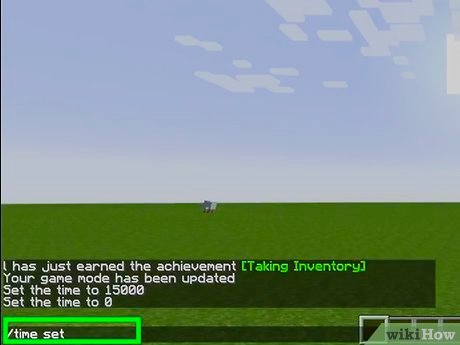
The most straightforward way is the /time command. It requires cheats enabled or operator permissions on servers:
- Open chat (press T on PC).
- Type
/time set dayor/time set nightand hit Enter. - For specific times, use
/time set <value>where0is dawn,6000noon, and18000midnight.
This jacks your game time instantly. Need to speed through night? Skip it with no fuss.
Creating Time Change Commands With Redstone
Blast through monotony by automating time changes with command blocks: a gamer’s ultimate hack. Here’s how:
- Place a command block in creative mode.
- Input
/time set day(or any time you like). - Use redstone signals to trigger it at intervals for day/night cycles or special events.
Pro Tip: Use a repeat command block for automatic time rotation without manual input.
Adjusting Time Without Commands
No cheats or commands? It’s slow, but here’s the deal:
- Wait out the natural 20-minute day/night cycle.
- Sleep in a bed at night to skip directly to day.
It’s boring and slow but viable if you want the vanilla experience untouched.
Common Command Inputs For Time Change
| Command | Effect |
|---|---|
/time set day |
Sets time to sunrise (value 0) |
/time set noon |
Sets time to midday (value 6000) |
/time set night |
Sets time to nightfall (value 13000+) |
/time set midnight |
Sets time to midnight (value 18000) |
/time add <ticks> |
Adds ticks to the current time |
Tips And Tricks For Best Time Control Experience
- Enable cheats or have admin rights for quick commands.
- Combine command blocks with redstone for automation.
- Use time manipulation to farm crops faster or control mob spawning.
- Experiment with skip night by sleeping in beds but remember it’s multiplayer-dependent.
💡
Common Mistakes When Changing Time
- Typing commands wrong – commands are case sensitive and must be exact.
- Forgetting cheats need to be enabled or permissions granted.
- Using commands in survival mode without necessary rights.
- Expecting time to stay permanently changed on some servers that auto-reset.
Advanced Ways To Manipulate Time
Using Datapacks Or Mods
Some mods and datapacks provide granular control beyond vanilla commands. Want accelerated days or custom cycles? Mods like “Time Control” allow it. This is for those who want Minecraft’s tempo on their terms.
Speeding Time Up
Want to speed time up without manually inputting commands constantly? The feature isn’t native but can be mimicked with command block loops that add ticks every second.
Check this cool guide to learn how to speed up time command in Minecraft.
Understanding Minecraft Time – What You Need To Know
The game time counts in ticks, with 20 ticks per second. One full cycle is 24000 ticks, equating to that roughly 20 real minutes day/night cycle. Knowing this helps when setting time manually.
Quick Fact: The time set command adjusts the in-game clock, but things like weather or server settings can override it.
Safety Considerations
Changing time can affect mob spawn timings. Skipping night removes threats but also hunting rare mobs at night. Decide your gameplay style carefully.
2026 Updates & Changes
Minecraft’s latest updates still support these commands with minor tweaks to command block behavior. Always keep your game updated for smooth control.
Want visual tips on this? Watch this tutorial on time changing in Minecraft.
Conclusion
Still asking, “How to change time on Minecraft?” Now you’ve got the full toolbox: commands, blocks, tricks, and automation. Don’t be slow about it—take control, shape your Minecraft day and night with precision. Remember, mastering your world’s time means more fun, safer crafting, and endless exploration possibilities. Try combining cheat commands with redstone contraptions for that pro edge! 🚀
For fresh, fun facts about time mechanics in Minecraft’s 2026 version, peek this video on Minecraft time facts, and keep leveling up your play.

Source: www.idtech.com
Frequently Asked Questions
Can I change Minecraft time on all platforms?
Yes, you can change time using commands on most platforms (PC, consoles), provided cheats or permissions are enabled. Some servers restrict this.
What command sets the time to night in Minecraft?
Use /time set night or /time set 13000 to jump straight to nighttime instantly.
Does changing time affect multiplayer servers?
It depends on server settings; some servers lock time to maintain fairness, while others allow admins or players with permissions to change time.
Can I automate time change without commands?
Automation requires command blocks or mods; without commands, you can only wait for natural cycles or skip night by sleeping.
How to speed up time in Minecraft?
Speeding up time isn’t native but can be simulated by command blocks running /time add commands repeatedly. See a detailed guide here.
What happens if I set time incorrectly?
Incorrect commands won’t change time and may return errors. Always double-check command syntax and permission status.

Christina is a technical guide writer and gaming enthusiast with years of experience breaking down complex game settings. Specializing in server optimization and game mechanics, they are dedicated to helping players seamlessly customize their Minecraft experience—from updating skins and usernames to managing technical version settings.