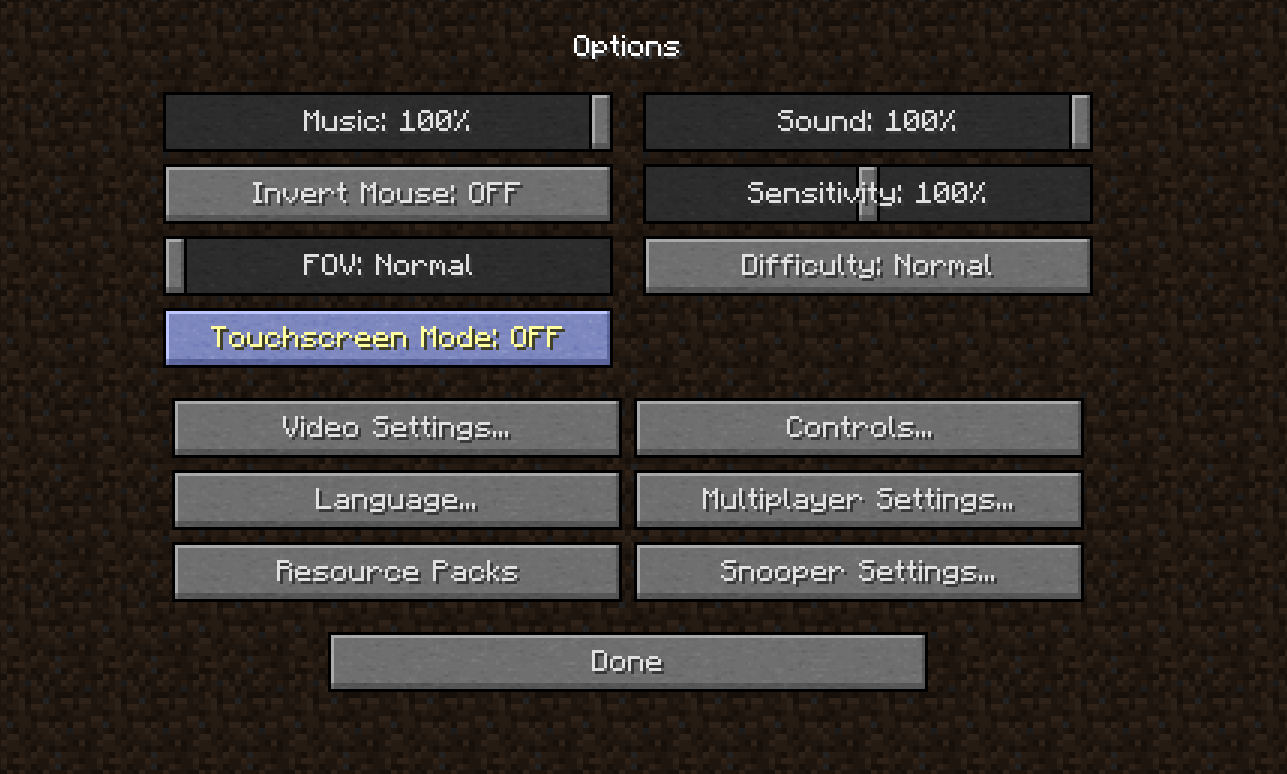
Ever blasted around a Minecraft world only to feel your mouse or controller sensitivity was off? How To Change Sensitivity On Minecraft is more than a curiosity—it’s the secret sauce to dominating your creative and survival worlds with pinpoint precision. Whether you’re wrangling a fresh PC setup or a console, dialing sensitivity right means smoother turns and quicker block hits, which can be a game-changer. This guide breaks it all down for you, no fluff, so your mouse or controller feels just right, every time.
Why Sensitivity Matters in Minecraft
Imagine trying to build a detailed castle with a sluggish mouse—or facing mobs in combat with slow aim. Minecraft’s sensitivity settings dictate how fast your camera moves. Too high, and you’re spinning out of control; too low, and it feels like molasses. The right sensitivity lets you nail everything from quick 180s in PvP to delicate landscaping in survival mode.
Step-By-Step Guide To Change Your Minecraft Sensitivity
- Launch Minecraft: Open your game and pause at the main menu or during gameplay.
- Access Options: Click the “Options” button from the menu.
- Find Sensitivity Slider: Look for the “Mouse Settings” or “Sensitivity” slider.
- Adjust Sensitivity: Drag the slider left for slower, right for faster sensitivity. Small changes can make a big difference—adjust incrementally.
- Test Changes: Jump back into the game and test your new settings. Try aiming at mobs or turning quickly. Repeat adjustments as needed.
For Xbox or PlayStation players, sensitivity settings are usually under controller or gamepad options, labeled as “Look Sensitivity” or simply “Sensitivity”.
Adjusting Mouse Sensitivity Outside Minecraft
Sometimes Minecraft’s in-game controls aren’t enough. Your operating system’s mouse settings also affect how sensitive your cursor moves.
On Windows: Go to Control Panel > Mouse > Pointer Options. Adjust the slider for pointer speed and disable “Enhance pointer precision” for consistent sensitivity.
On Mac: System Settings > Mouse. Adjust tracking speed to match your Minecraft preferences.
Pro Tips To Nail Perfect Sensitivity
- Start low and increase slowly — sprinting sensitivity is rough without control.
- Try in different game modes: Creative builds demand different handling than Survival or PvP battles.
- Consider your hardware — gaming mice with DPI buttons let you switch sensitivity on-the-fly without menus.
- Record your favorite settings to avoid losing them after updates or device changes.
- Check community forums for settings that pros use as starting points.
Sensitivity on Consoles: Xbox & PlayStation
Controller sensitivity controls how quickly the view pans around. To adjust on Xbox or PlayStation:
- Go to Settings in Minecraft.
- Select Controller Options or Gamepad Settings.
- Find Look Sensitivity slider.
- Adjust and test to get comfortable turning speeds.
Console sensitivity tweaks in Minecraft 2026 include separate settings for horizontal and vertical sensitivity, meaning you can fine-tune each axis independently.
Common Mistakes When Changing Sensitivity
- Changing sensitivity drastically in one go, resulting in loss of control.
- Not testing settings in different environments (combat vs. build).
- Ignoring system mouse settings that conflict with in-game adjustments.
- Overlooking console distinction in adjustment menus causing confusion.

Source: www.youtube.com
Frequently Asked Questions
How do I change sensitivity in Minecraft PC?
Open Minecraft, go to Options > Controls, and adjust the “Mouse Sensitivity” slider as needed. Test then keep fine-tuning.
Can I adjust sensitivity differently for vertical and horizontal movement?
Yes, newer versions of Minecraft (especially consoles in 2026) allow separate horizontal and vertical sensitivity settings for precision.
Does sensitivity affect gameplay speed?
Indirectly, yes. Better sensitivity means quicker response times and better building or fighting speed.
What if my mouse or controller sensitivity doesn’t change after adjusting settings?
Check your system’s mouse or controller settings as they might override the Minecraft settings. Also, consider updating your device drivers.
Is there a recommended sensitivity for beginner Minecraft players?
Start low (around 30-40% of maximum) to keep control and increase as you get comfortable with game mechanics.
Adjusting settings is absolutely key to playing well in Minecraft. With How To Change Sensitivity On Minecraft, you’re not just toggling a number but taking command of your entire gameplay experience. Remember, precision is power, whether you’re darting around dangerous mobs, piecing together a fleet of redstone contraptions, or just soaking up the blocky world around you. Don’t settle for the default. Tinker, test, and then dominate. For visual learners, check out the detailed walkthrough on how to change mouse sensitivity on Minecraft in 2026 right here — it’s incredibly practical. And if console is your turf, this guide on changing sensitivity across platforms breaks down every step elegantly. 🚀

Christina is a technical guide writer and gaming enthusiast with years of experience breaking down complex game settings. Specializing in server optimization and game mechanics, they are dedicated to helping players seamlessly customize their Minecraft experience—from updating skins and usernames to managing technical version settings.